Blackmagic Design Workflow
podcast setup with blackmagic design
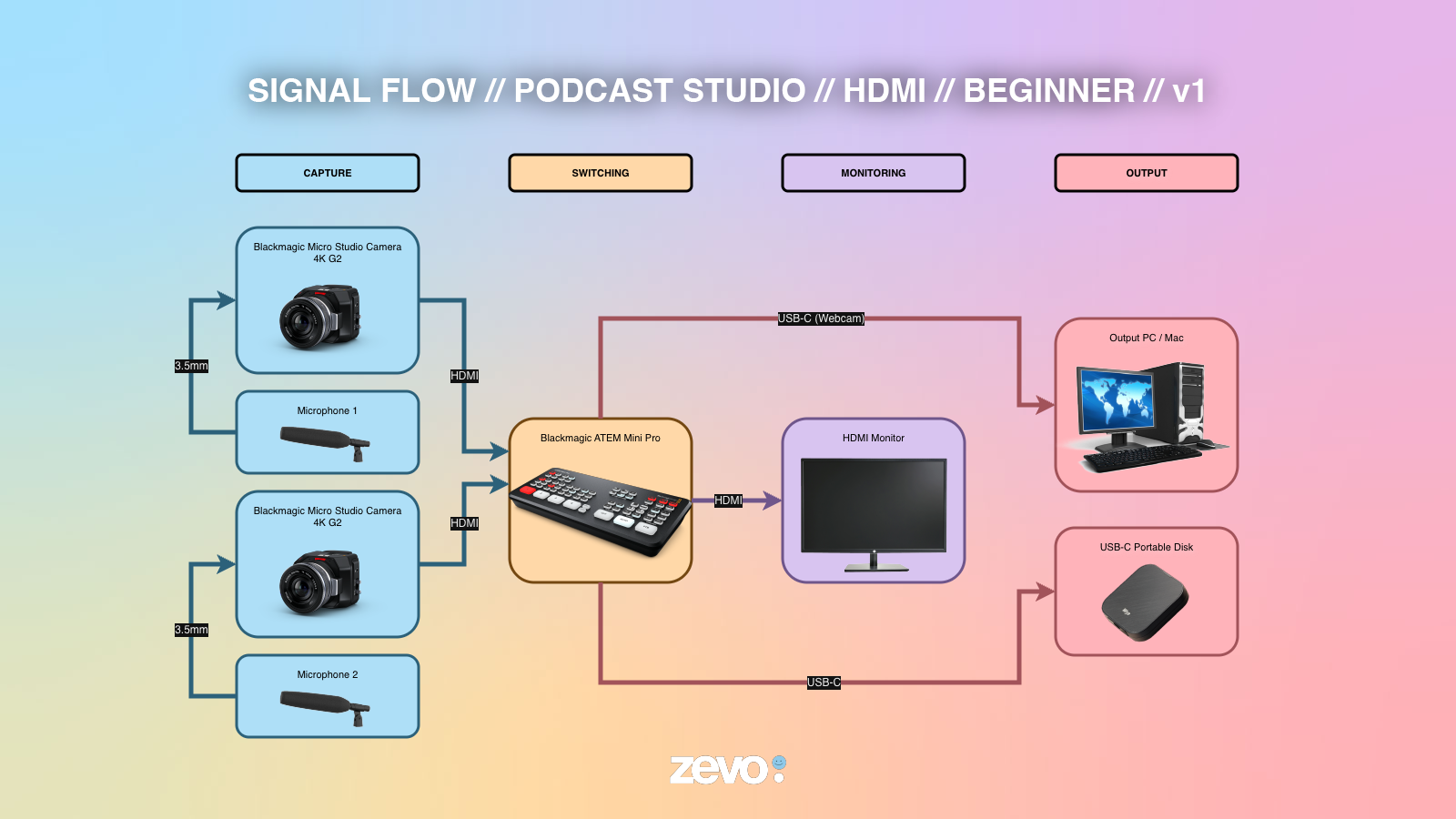
This is the setup most people start with when they are ready to step up from a webcam and create a production that looks polished and professional. Two Blackmagic Micro Studio Camera 4K G2 units are positioned across from the hosts, with each camera connected to the ATEM Mini Pro using a single HDMI cable.
Audio feeds directly into each camera through the 3.5 mm input, keeping the desk tidy and cable runs short. From the ATEM Mini Pro, the program output is sent via USB-C as a webcam signal to a streaming PC, where OBS Studio or vMix handles the live stream or recording.
At the same time, a USB flash drive connected to the ATEM Mini Pro records a local backup, so your production is protected even if the internet connection drops halfway through the episode.
The entire workflow runs on a single switcher, just a handful of cables, and no external converters. It is compact enough to fit inside a Pelican case and can be unpacked, connected, and ready to stream in under 30 minutes.
church livestream with blackmagic design
Churches were among the earliest adopters of live streaming, and this workflow reflects how many medium-sized congregations produce their weekly services today.
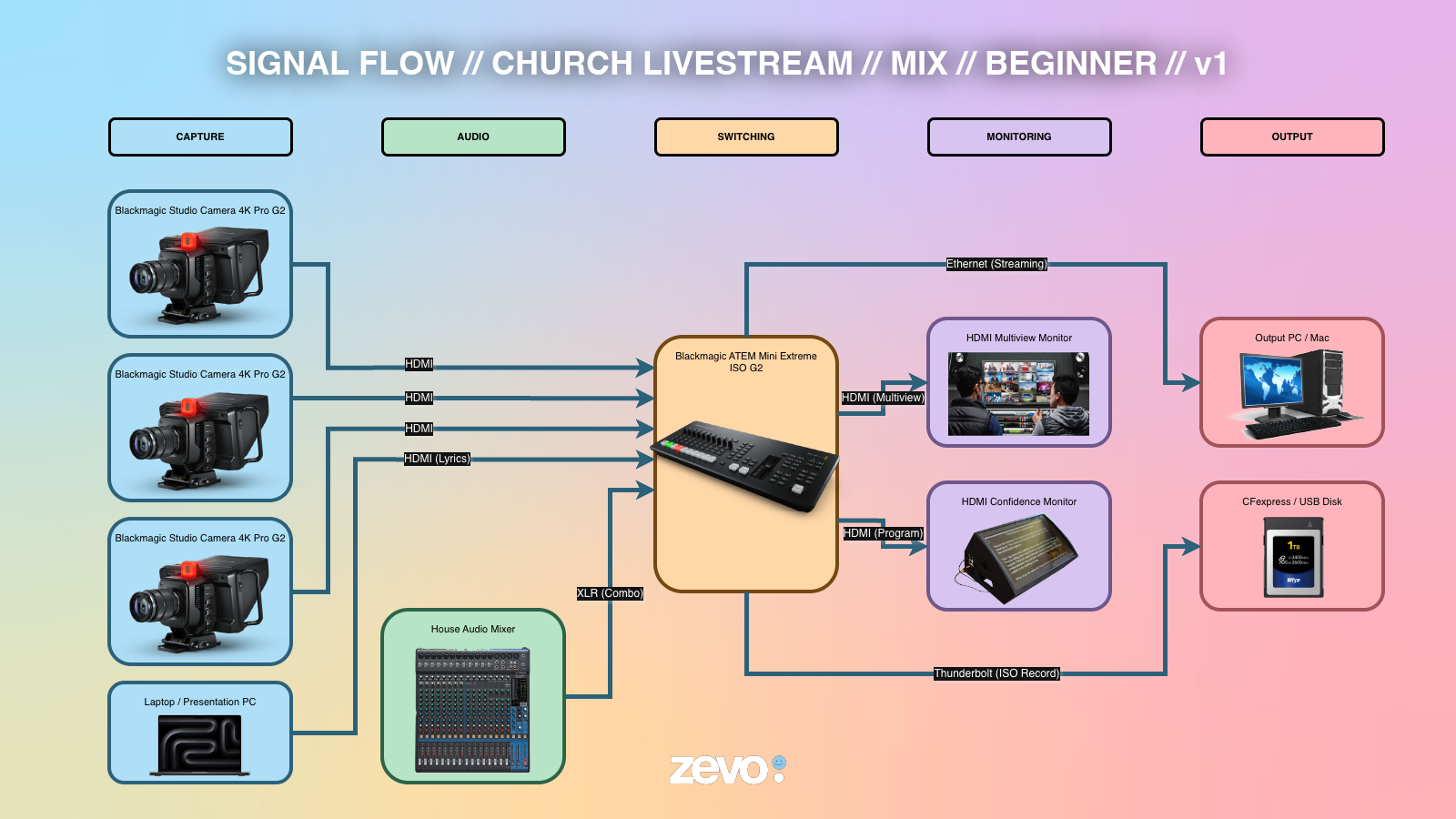
Three Blackmagic Studio Camera 4K Pro G2 cameras capture the stage from multiple angles, while a laptop running ProPresenter or Microsoft PowerPoint supplies worship lyrics and sermon slides as a fourth HDMI source.
Everything connects to the ATEM Mini Extreme ISO G2, which handles far more than its compact size suggests. The built-in Downstream Keyer (DSK) automatically overlays lyrics and presentation graphics onto the live program, while the house audio mixer plugs directly into the switcher’s XLR combo inputs, eliminating the need for a separate audio interface.
The integrated streaming engine sends the program directly to YouTube or Facebook Live, allowing the production to stream without relying on a dedicated streaming PC.
Meanwhile, the ISO recording feature captures every camera as an individual video file. This gives the media team the flexibility to edit each angle later, making it easy to create sermon highlights, worship clips, and social media content after the service. For a production that fits on a small desk at the back of the sanctuary, it delivers capabilities normally found in much larger broadcast systems.
sports broadcast with blackmagic design
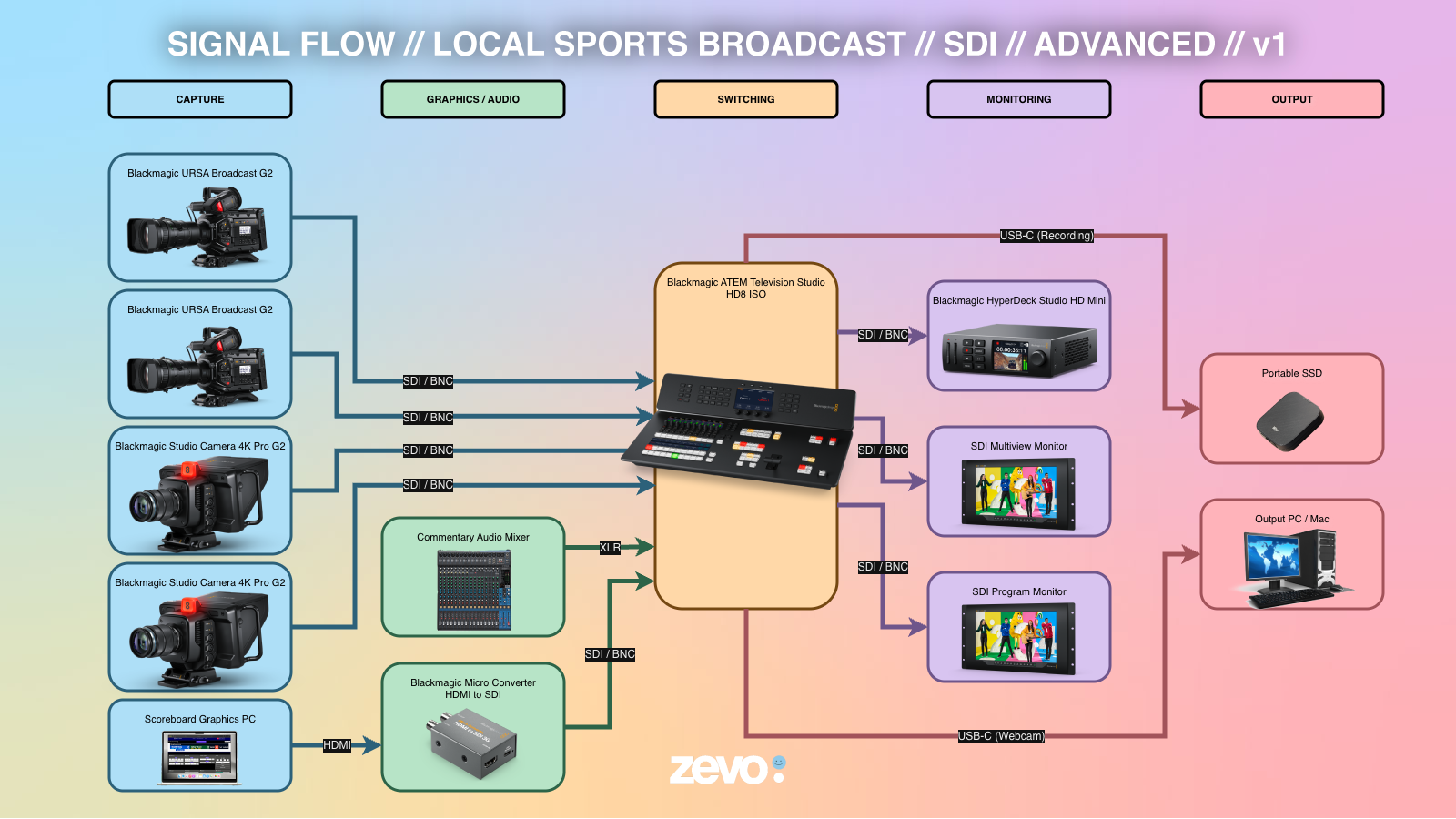
This is the kind of workflow you would expect to find inside a small outside broadcast (OB) truck covering a regional football match, a school athletics competition, or any live sporting event that demands professional broadcast quality.
Four cameras feed the switcher over SDI. Two Blackmagic URSA Broadcast G2 cameras capture the main wide shot and the primary sideline angle, while two Blackmagic Studio Camera 4K Pro G2 units cover the end zone and the commentary desk. A dedicated scoreboard graphics computer outputs over HDMI, which is converted to SDI using a Blackmagic Micro Converter before entering the production workflow.
Commentary audio connects directly to the ATEM Television Studio HD8 ISO through its XLR inputs, allowing the built-in audio mixer to handle the broadcast mix without requiring an external audio embedder or converter.
During the event, the ATEM Television Studio HD8 ISO simultaneously records every SDI camera feed as an individual ISO file to an attached USB drive. A DaVinci Resolve workstation can immediately access these recordings, allowing the replay operator to mark key moments and prepare instant replays while the event is still in progress.
The replay system sends separate fill and key signals back through an UltraStudio 4K Mini into dedicated switcher inputs, allowing replay graphics to be inserted seamlessly into the live program. Finally, two Blackmagic SmartView 4K monitors provide the director with a full multiview of every source alongside a clean program output, ensuring complete confidence throughout the entire production.